Links and Drill-Downs
Every click interaction in dbt Charts is a link: drilling down from a bar to the rows behind it, filtering a whole board by clicking a slice, opening a record's detail page from a table row, jumping from one board to the next. There is no separate drill-down feature or action system to learn. There are variables, and there are links that set them.
How it fits together
Three facts explain every interaction on this page:
- A variable is a board's state.
status,region,account_id: the values a board's queries filter on. See Variables. - The URL carries that state. Opening a board at
?status=newsets itsstatusvariable tonew, exactly as picking "new" in the dropdown would. Any board with variables is addressable at any of its states. - A link is a URL filled in from the data.
link: "?status={{ x }}"on a bar chart writes the clicked bar's value into the URL.
So a link to ?status=new filters the board you are on, and a link to
/tickets/list?status=new opens another board already filtered. The first
is cross-filtering; the second is a drill-down. They are the same line of
YAML with a different path.
| To do this | Write this |
|---|---|
| Filter the other charts on the board when a mark is clicked | link: "?status={{ x }}" |
| Drill down from a mark to a detail board | link: "/tickets/list?status={{ x }}" |
| Open that detail in a modal or a hover-sized preview | link: with open: modal or open: preview |
| Make each table row open its record | link: "/tickets/detail?id={{ id }}" on the table |
| Send one table column somewhere else | link: on that column under style.columns |
| Filter by clicking a legend entry | link: "?metric={{ color }}" |
| Link from prose, carrying the current filters | A Markdown link in text: |
| Give a detail board a clean URL per record | aliases: with a <name> segment |
Link every chart and table to its underlying rows, with no link: at all |
links.auto: true |
Filter a board by clicking a chart
A link: that starts with ? sets a variable on the board you are on. Every
query that reads the variable re-runs, so one click filters every chart wired
to it.
variables:
  status:
    options:
      static: [new, solved]

queries:
  by_status:
    sql: |
      SELECT status, COUNT(*) AS tickets
      FROM dundersign.tickets
      GROUP BY status
  by_priority:
    sql: |
      SELECT priority, COUNT(*) AS tickets
      FROM dundersign.tickets
      WHERE {{ filter('status', status) }}
      GROUP BY priority

charts:
  by_status:
    type: bar
    query: by_status
    x: status
    y: tickets
    link: "?status={{ x }}"
  by_priority:
    type: bar
    query: by_priority
    x: priority
    y: tickets
    title: "Priority{% if status %} of {{ status }} tickets{% endif %}"

rows:
  - by_status
  - by_priority
Clicking the new bar sets status to new. The priority chart
re-queries, its title changes, the dropdown shows "new", and the clicked bar
stays inked while its neighbors recede. The URL now ends in ?status=new, so
the filtered board can be bookmarked or shared as it stands.
The dropdown and the bar are two ways to set one variable. A reader who never
finds the dropdown can still explore by clicking, and a variable can drop its
control entirely with visible: false and be driven only by links.
Legends work the same way. With link: "?metric={{ color }}" on a chart
colored by metric, clicking a legend entry sets the variable. See
In-page variable updates.
Drill down to another board
Put a board path in front of the ? and the same link opens a different
board with its variables already set:
queries:
  by_status:
    sql: |
      SELECT status, COUNT(*) AS tickets
      FROM dundersign.tickets
      GROUP BY status

charts:
  by_status:
    type: bar
    query: by_status
    x: status
    y: tickets
    link: "/customer-support/tickets/list?status={{ x }}"

rows:
  - by_status
The target board needs nothing special. It declares a variable and filters on it, like any board:
variables:
  status:
    options:
      static: [new, solved]

queries:
  tickets:
    sql: |
      SELECT id, subject, status, priority
      FROM dundersign.tickets
      WHERE {{ filter('status', status) }}

charts:
  tickets:
    type: table
    query: tickets

rows:
  - tickets
Opened from the new bar it lists new tickets. Opened from the board list it lists every ticket, and its dropdown still works. One detail board serves every summary board that links to it, and a board built to be a drill-down target is also a complete board on its own.
Chart links fill in {{ x }}, {{ y }}, {{ color }}, and {{ theta }}
from the clicked mark, and any other {{ name }} from that column of its
row. Paths starting with / resolve from the board root, and ./ and ../
resolve from the current board. See
Drill-Down Links and
Linking Between Boards.
Open the detail without leaving
A link can open its target over the current board instead of replacing it:
link:
  url: "/customer-support/tickets/list?status={{ x }}"
  open: modal
modal opens the target board in a dialog. preview shows it scaled down
beside the clicked mark, for a quick look that closes when you click away.
new_tab opens a tab. The board inside a modal is live: its filters work
and its own links keep drilling, with a back arrow to return. Set
links.open at the board root to make one of these the default for every
link. See
Opening a link in a modal, preview, or new tab.
Link table rows and cells
On a table, link: templates read any column of the row by name. A link on
the table makes the whole row clickable; a link on a column makes that
column's cells go somewhere else:
queries:
  new_tickets:
    sql: |
      SELECT id, subject, status, requester_id
      FROM dundersign.tickets
      WHERE status = 'new'

charts:
  tickets_table:
    type: table
    query: new_tickets
    link: "/customer-support/tickets/detail?id={{ id }}"
    style:
      columns:
        status:
          link: "/customer-support/tickets/list?status={{ status }}"
        requester_id:
          visible: false

rows:
  - tickets_table
A hidden column still feeds a link template, so a row can link by an id the table never displays. See Tables.
Link from text
Markdown links in a text: block use the same paths. Text is templated with
the board's variables, so a link can carry the reader's current filters to
the next board:
variables:
  status:
    options:
      static: [new, solved]

text: |
  [See every {{ status or 'ticket' }} in the backlog](/customer-support/backlog?status={{ status }})
Give a record its own URL
A parameterized alias turns a path segment into a variable, so a detail board gets a clean URL per record:
aliases:
  - /accounts/<account_id>

variables:
  account_id:
    label: Account
/accounts/4182 opens this board with account_id set to 4182. See
Parameterized aliases.
Link everything automatically
links.auto: true at the board root links charts and tables that have no
link: of their own to the built-in data pages: a table row opens its
record, and a chart mark opens the rows behind it, filtered to that mark.
links:
  auto: true
  open: modal
With open: modal, every bar on the board becomes a click to see its rows,
without leaving the board and without a detail board to write. See
Auto-linking tables and charts.
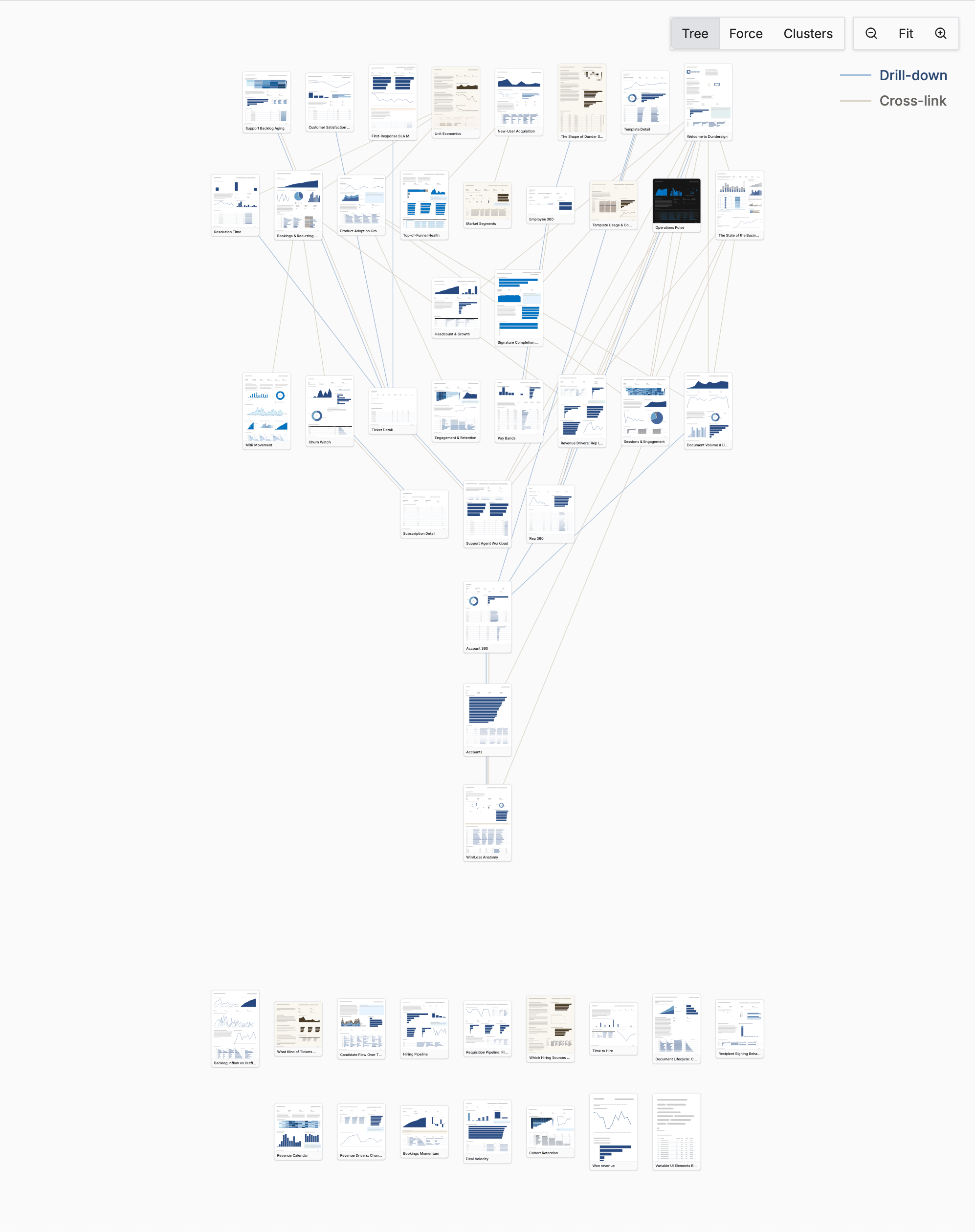
A project is a web of boards
Links are what turn a folder of boards into something a reader can explore: start at an overview, click the number that looks wrong, land on the board that explains it, and click through to the record. Each board stays small and answers one question, and the links carry the context between them.
This is the Dundersign demo project, drawn by the network view in dbt Charts Platform. Each thumbnail is a board, each blue line is a drill-down, and each gray line is a cross-link:
A few habits make a project link well:
- Build detail boards around one variable. A
ticket detailboard that readsid, anaccountboard that readsaccount_id. Anything with that id can then link to it. - Name variables the same across boards. If every board calls it
region, a link written for one target works for the next. - Link the number, not a button. Put the
link:on the chart, the KPI, or the table row a reader is already looking at. - Use
…/listand…/detailpaths for the two common targets, so link paths are predictable. See the list / detail convention.
Related
- Variables: declaring variables and wiring them into queries
- Chart Interactions: the full
link:reference, tooltips, and legend clicks - Linking Between Boards: path resolution, aliases, and
links:settings - Drill-Down Boards: a rendered example