Access Control
dbt Charts Cloud
This page describes dbt Charts Cloud, the hosted
product — these features are not part of the open source dct
engine.
dbt Charts Cloud governs who can see and edit dashboards the same way you already think about shared folders: where a dashboard lives decides who can see it, unless a more specific rule says otherwise. Sharing a folder shares everything in it; sharing one dashboard inside that folder narrows or widens access for that dashboard alone.
All access changes happen in Cloud, never in git. A dashboard's YAML never
carries a permission field, and no _cloud.yaml or similar file records who
can see it. Cloud is the single source of truth for access, and its admin
surface and audit trail are where you go to read or change it.
The filesystem mental model
Think of your project like a shared drive:
Grant the finance team access to the finance/ folder, and every dashboard
inside it (present and future) is visible to them. Move
quarterly_summary.yaml into public-reports/, and it picks up that folder's
access, the same way moving a file into a different Drive folder changes who
can open it.
The key Cloud binds access to is a dashboard's path: its file location
relative to the project root, with the file suffix stripped
(finance/revenue_exec, not finance/revenue_exec.yaml). Folders are keyed
with a trailing slash (finance/). The branch a dashboard happens to live on
is never part of that key; access to a path is the same whether you're
looking at the trunk branch or a preview of a feature branch.
Longest-prefix resolution
A dashboard's effective access is resolved by walking from the broadest scope to the most specific:
- The project's default access: the broadest scope, what everything in the project inherits absent a more specific rule
- Each directory the dashboard's path passes through, outermost to innermost
- The dashboard's own exact path, if it has a specific grant
Each more specific scope either replaces the access inherited from above it, or adds to it; that's a choice you make when you grant access at a given path, not a fixed rule. "Share this folder with Alice in addition to whoever can already see it" and "restrict this one dashboard to Alice only" are both ordinary grants; they just differ in whether they inherit from the parent.
Because resolution is purely path-based, a new dashboard needs no setup to
have sensible access: drop it in finance/ and it inherits finance/'s
access immediately. Nothing needs reconciling.
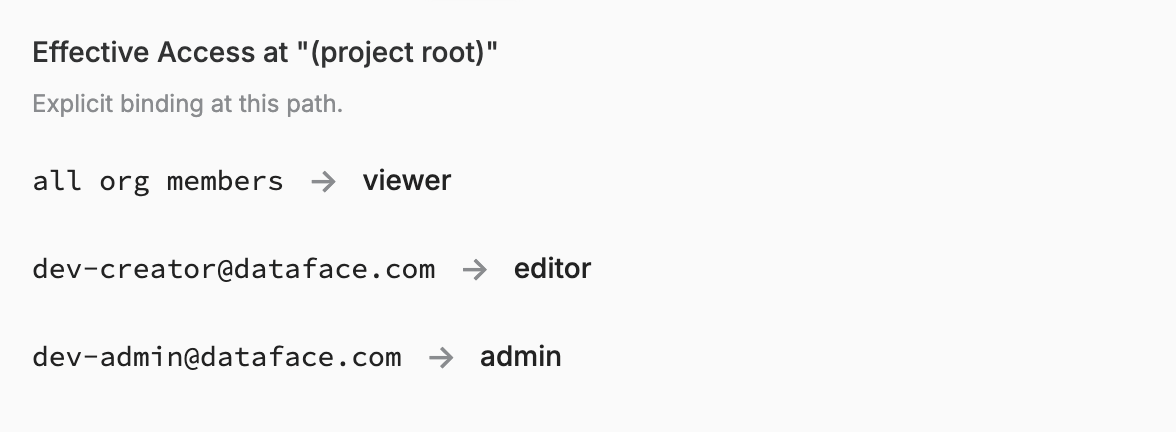
The Access tab on a project's settings shows exactly this, path by path: which grants apply, and whether they're explicit at the path you're looking at or inherited from an ancestor.
Roles as entitlement atoms
Access grants pair a principal (who) with a role (what) at a path:
- Principals: an individual, a group, a group synced in from your identity provider, everyone authenticated in your organization, or "everyone" (anonymous, public visitors; see Public access below).
- Roles are built from a small set of underlying capabilities: viewing a dashboard, editing it (which covers creating, saving, promoting, moving, and deleting), triggering a refresh, managing who else has access at a path, managing data source connections, and browsing raw data directly. The built-in roles are Viewer (view only), Editor (view, edit, refresh), and Admin (view, edit, refresh, and manage access), and custom roles can be composed from the same underlying capabilities for finer-grained needs.
Being able to create dashboards in a folder is just holding an Editor-level grant there; there's no separate "creator" concept. Whoever can edit a path can also create new dashboards under it.
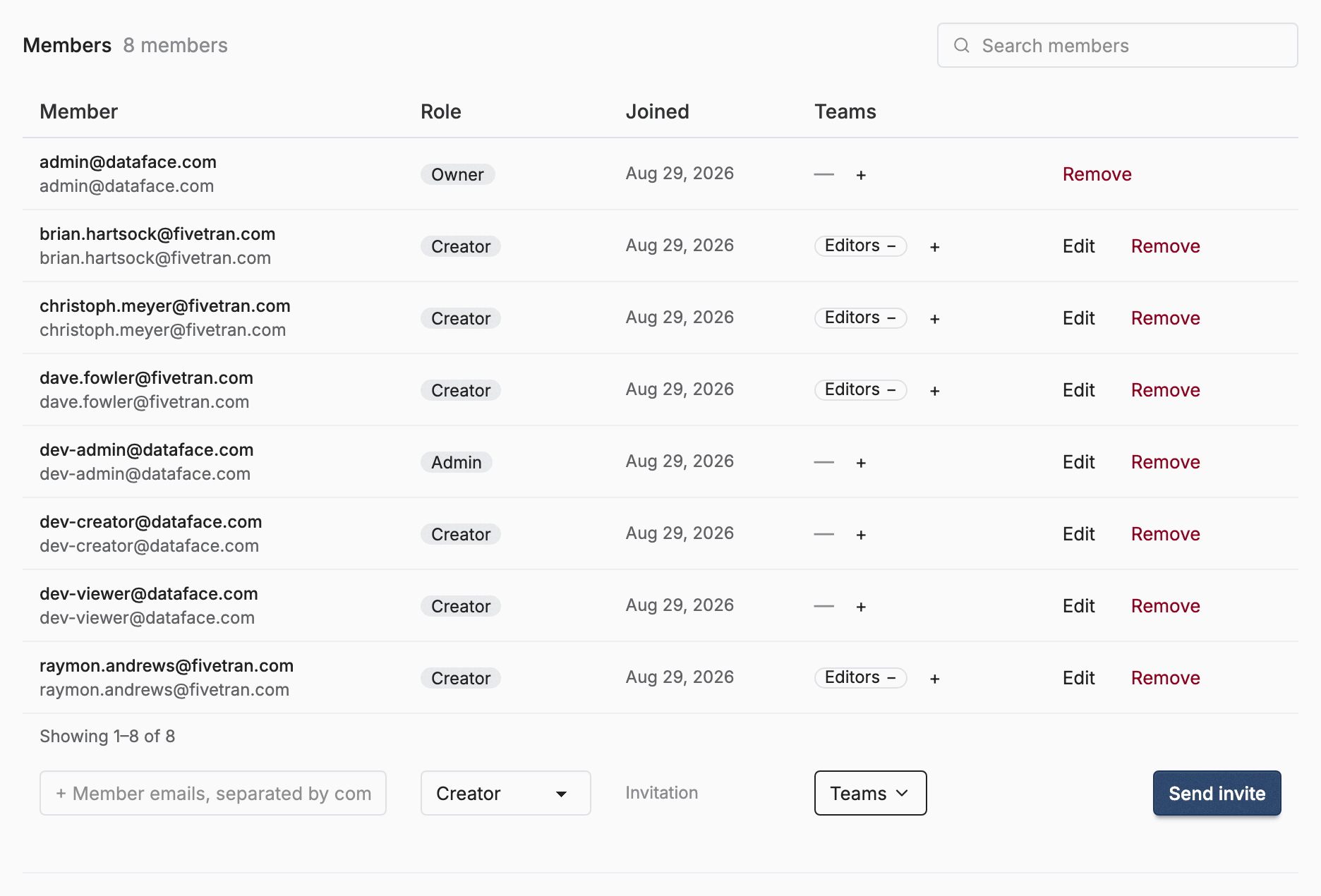
Membership in your organization is a separate axis from dashboard access: being a member doesn't automatically grant view or edit rights to any dashboard. Organization-wide visibility is an explicit grant ("every member can view this project"), not an implicit consequence of joining. The Members page manages that first axis: who belongs to the organization, and at what organization role, which is a different list from any one path's access grants:
Public access: org and project opt-in
Public access has no per-dashboard flag. It's the same mechanism as any other grant: the "everyone" principal gets a Viewer role at a path, and anonymous visitors resolve as that principal.
Because any path is one grant away from being reachable by anyone, public access is additionally gated by two independent switches, both off by default:
- An organization-level switch: the outer gate. Off means no project in the organization can serve anything publicly, no matter what any project or dashboard is configured to do.
- A project-level switch: the inner gate. Off means that project serves nothing publicly, even when the organization allows it.
Both must be on, in addition to an everyone-principal grant on the path, for a dashboard to actually be reachable without logging in. This makes a strict, nothing-is-public posture the default, and turning on public access a deliberate act at each level rather than something that happens by accident. Cloud also won't let you add a new public grant on a path while either switch is off; you can't opt a dashboard into public access the gates don't yet allow. Either switch is an instant kill switch: turn one off and every path under it stops being served publicly, no matter what grants exist. Those grants aren't deleted; they're held inert while the switch is off, and flip the switch back on and they apply again with nothing to re-create.
The admin surface makes this auditable. The organization view lists the switch itself, plus every dashboard it currently exposes publicly across the org's projects:
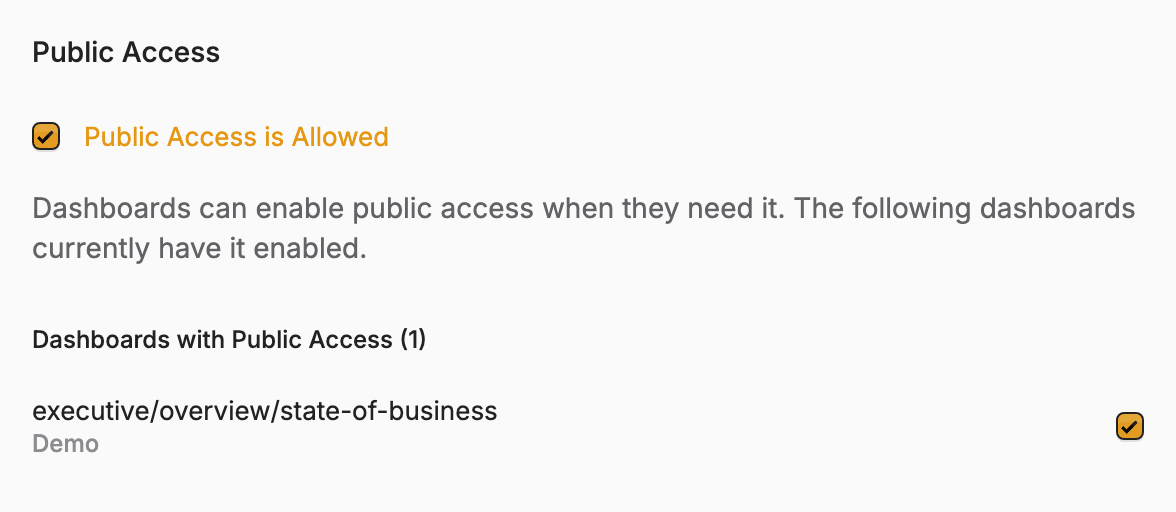
A project's own settings separately list which dashboards its grants would expose publicly, regardless of whether that project's own gate happens to be open or closed at the moment, so a grant made while the gate is closed is never a blind spot once someone flips it back on:

Flipping either switch is itself recorded in the audit trail, at whichever level was toggled.
Reading a board with a CLI token
The token dct cloud login stores is not only an API credential: it reads
board pages too, so the tool that publishes a board (or a CI job, or an agent)
can fetch the board it just published instead of handing a URL to a person.
Send it as an ordinary bearer header:
The token authenticates; it grants nothing. The board's own access rules decide exactly as they do for that person in a browser, so a token cannot reach a board its owner cannot reach. Three further limits apply:
- Read only.
GETandHEADon board-viewing URLs. This covers the board page, its snapshot pages, its.svg/.png/.pdfexports, and the render artifacts the page embeds. Every editing, renaming, refreshing, or variable-setting URL refuses a token, whatever its scope. - The
dashboards:readscope. A token issued without it reads nothing, even for a user who has full access. A token's scope can narrow what its owner can do and can never widen it. - The organization it was approved for. Approving
dct cloud loginpicks one organization; the token reads boards in that organization only, even if its owner belongs to others.
One endpoint is deliberately outside this: the poll a board page uses while a
render is still in flight answers to signed-in browser sessions only. Wait
until dct cloud boards reports that board ready, and the completed board
and its artifacts are readable.
A token that is expired, revoked, unrecognized, or approved for a different organization is not reported as a bad token. The response is exactly what an anonymous request to that URL gets, because telling the two apart would let anyone map which boards exist.
Drafts
A draft dashboard lives in a private working area, visible only to the person who created it; no grant or public setting on the rest of the project reaches into it. Promoting it to a destination path re-checks access at that moment: the person promoting must be allowed to edit the destination, or it stays a draft. Once promoted, it takes on that path's access like any other dashboard living there.